
Introduction
CSS3 is getting a lot of attentions recently. Myself, as a front end developer, I'm absolutely in love with CSS3. Rounded corner, drop shadow and rotation couldn't be easier! The only drawback is, CSS3 standard is not fully implemented by most browsers and also, I believe you will get a lot of CSS validation errors as well. However, there are quite a lot of websites start using it already, for example, Twitter, it uses rounded border, and replace the rounded border with images if you viewed it with IE 7 or 8, and totally ignore IE6 users (*salute*, well done twitter).
And another great example with CSS3 and CSS3 animation: Neutron Creation
This post is all about CSS3 and Javascript. With all the new features that come with CSS3, there are whole lot of animation possibilites that can't be achieve before. So, Check this out and get inspired!
- Polaroid photo viewer with CSS3 and jQuery | demo
![]()
By combining the CSS3 Box Shadow and Rotate properties, this effect is relatively easy to create. When dragging a polaroid around, you'll see the shadow. When it's placed down, it's rotated to the left or the right (random).
 - Sweet AJAX Tabs With jQuery 1.4 & CSS3 | demo
![]()
Organizing the content of a page in a both intuitive and eye-catching manner, is a must in modern web design. One principle that has been around for some time is dividing text into tabs. This allows you to squeeze much more content in a seemingly limited space and provide a structured way of accessing it.
 - jSlickmenu: A jQuery plugin for slick CSS3 menus- demo
![]()
The plugin called jSlickmenu, creates, well, slick menus with jQuery. Combined with some great CSS3 features likes rotation and shadows, this plugin can really lift up your design. It's fairly easy to use, highly customizable and pretty cool (and fun!) to see. - jQuery CSS3 Lightbox Gallery Script - demo
![]()
The script will be able to scan a folder of images on your web server and build a complete drag and drop lighbox gallery around it, and with tutorial teach us to create an awesome image gallery which leverages the latest CSS3 and jQuery techniques. - CSS3 Styled jQuery Dropdown | demo
![]()
This is really nice and simple jQuery dropdown menu on CSS Tricks and I thought, let’s add some neat style to it. - images gallery using css3 and jquery | demo
![]()
This is tutorial for creating a very simple but great looking css3 image gallery using jquery and css3. The image gallery will be tited to the side and on hover will move. Whenever you click on the image a lightbox will pop out. So lets begin. - Old School Clock with CSS3 and jQuery | demo
![]()
It all started when I was looking at the WebKit blog and saw an article on the new CSS3 animations and the one that caught my eye was ‘rotate’. I started thinking what the hell can you rotate on a webpage (it’s animated GIF’s times ten!). Then it hit me — a clocks hands rotate! Bingo! - jQuery DJ Hero - CSS3 and jQuery fun - demo
![]()
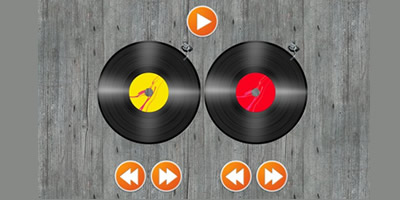
By combining CSS3 and jQuery, I created two records that you can start spinning (faster and slower) and even scratching is enabled. In a future version, this could be used together with some real sound (this version has no sound). - Floated lists with CSS3 and jQuery | demo
![]()
We should all be using advanced CSS selectors by now—they make our lifes so much easier! In this quick tutorial, I’m going to explain how you can have a nicely floated list of items. We will use jQuery to make sure IE understands it too. - Windows Aero using CSS3 and jQuery | demo
![]()
Windows Aero-look with a little gaussian blur and a couple of lines of jQuery, and we can make a draggable window inside a webpage act like a desktop window.








Comments will be moderated and
rel="nofollow"will be added to all links. You can wrap your coding with[code][/code]to make use of built-in syntax highlighter.http://bit.ly/iDh6dp
http://bit.ly/iDh6dp