Register now or login here to start promoting your blog and your favourite articles.
jQuery Tabbed Interface / Tabbed Structure Menu Tutorial
19 Mar 2009 - 68 Comments
Tabbed Interface or Tabbed Structure Menu is getting really famous in web design & development. This tutorial will show you how to build your own tabbed Interface using jQuery with slideDown/slideUp effect. Be sure to check out the demo, you definetely will like it.
Author: kevin | Source: queness
Demonstration Download

1. Introduction

Nowadays, a lot of websites are using tab based content as a way to save spaces in a webpage. I have seen a lot of wordpress websites using a tabbed interface for its category, posts, comments and random posts content. It's a good "space-saver" and if used it correctly, it can boost your website usability as well. Right, first of all, we need to have the ideas and the design structure for this tabbed interface.

Before we start, if you are looking for a web hosting company, this is a good review - Hostgator Review.

My ideas:
  • Buttons on the top, content reside in different DIV elements,
  • Click on one of the buttons, it shows the relevant content;
  • Click on other buttons, it hides the existing and display the correct one.

The Design structure:
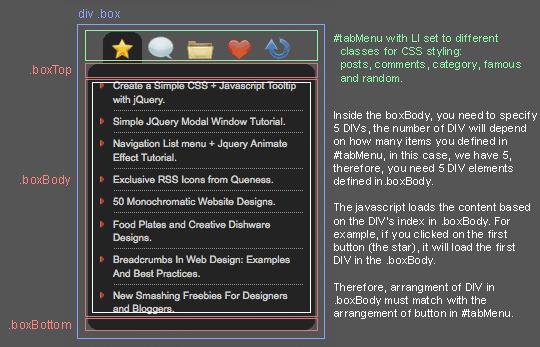
tab menu structure diagram

* Thanks to WeFunction.com for the amazing icons


2. HTML

In case the image above doesnt load, allow me to explain the design structure again. The UL#tabMenu is the buttons on the top a.k.a. Tabs. This is where you click, and it will trigger the jQuery to loads the content.

Inside the boxBody, you need to specify 5 DIVs, the number of DIV will depend on how many items you defined in #tabMenu, in this case, we have 5, therefre, you need 5 DIV elements defined in .boxBody.

The javascript loads the content based on the DIV's index in .boxBody. For example, if you clicked o the first button (the star or index 0), it will load the first DIV in the .boxBody (DIV index 0).

Therefore, arrangement of DIV in .boxBody must match with the arrangement of button in #tabMenu.

<div class="box">

  <ul id="tabMenu">
    <li class="posts selected"></li> 
    <li class="comments"></li>
    <li class="category"></li>
    <li class="famous"></li>
    <li class="random"></li>
  </ul>

  <div class="boxTop"></div>

  <div class="boxBody">
  	
    <div id="posts" class="show">
      <ul>
        <li>Post 1</li>
        <li>Post 2</li>
        <li class="last">Post 3</li>
      </ul>  
    </div>  
  
    <div id="comments">
      <ul>
        <li>Comment 1</li>
        <li>Comment 2</li>
        <li class="last">Comment 3</li>
      </ul>
    </div>
  
 	<div id="category">
   	  <ul>
   	    <li>Category 1</li>
   	    <li>Category 2</li>
		<li class="last">Category 3</li>
   	  </ul>  
   	</div>
  
  	<div id="famous">
      <ul>
        <li>Famous post 1</li>
    	<li>Famous post 2</li>
    	<li class="last">Famous post 3</li>
	  </ul>  
    </div>
  
	<div id="random">
	  <ul>
        <li>Random post 1</li>
	    <li>Random post 2</li>
    	<li class="last">Random post 3</li>
   	  </ul>    
	</div>        

  </div>

  <div class="boxBottom"></div>

</div>


3. CSS

You can always modify it to match your website. I will attach the psd file for this tutorial in the download and edit the css carefully. : ). Any suggestions please comment.

<style>

a {
	color:#ccc;
	text-decoration:none;
}

a:hover {
	color:#ccc;
	text-decoration:none
}

#tabMenu {
	margin:0;
	padding:0 0 0 15px;
	list-style:none;
}

#tabMenu li {
	float:left;
	height:32px;
	width:39px;
	cursor:pointer;
	cursor:hand
}

/* this is the button images */
li.comments {background:url(images/tabComment.gif) no-repeat 0 -32px;}
li.posts {background:url(images/tabStar.gif) no-repeat 0 -32px;}
li.category {background:url(images/tabFolder.gif) no-repeat 0 -32px;}
li.famous {background:url(images/tabHeart.gif) no-repeat 0 -32px;}
li.random {background:url(images/tabRandom.gif) no-repeat 0 -32px;}

li.mouseover {background-position:0 0;}
li.mouseout {background-position:0 -32px;}
li.selected {background-position:0 0;}

.box {
	width:227px
}

.boxTop {
	background:url(images/boxTop.gif)no-repeat;
	height:11px;
	clear:both
}

.boxBody {
	background-color:#282828;
}

.boxBottom {
	background:url(images/boxBottom.gif) no-repeat;
	height:11px;
}

.boxBody div {
	display:none;
}

.boxBody div.show {
	display:block;
}


.boxBody #category a {
	display:block
}

/* styling for the content*/
.boxBody div ul {
	margin:0 10px 0 25px;
	padding:0;
	width:190px;
	list-style-image:url(images/arrow.gif)
}

.boxBody div li {
	border-bottom:1px dotted #8e8e8e; 
	padding:4px 0;
	cursor:hand;
	cursor:pointer
}

.boxBody div ul li.last {
	border-bottom:none
}

.boxBody div li span {
	font-size:8px;
	font-style:italic; 
	color:#888;
}

/* IE Hacks */
*html .boxTop {margin-bottom:-2px;}
*html .boxBody div ul {margin-left:10px;padding-left:15px;}

</style>


4. Javascript

Alright, the fun part. It took me a while to read the jQuery documentation to make it works the way I want. And yes, I made it. As usual, I have put comments on each line. I put the animate effect on category page. I have a tutorial about it - Navigation List menu + Jquery Animate Effect Tutorial


5. Finally

You will get a beautiful jQuery Tabbed Side Menu!

However, in category page, if you were using IE, the LI can't be hightlighted when mouse hover it in (that's why we all hate IE). If you know what's the problem, please advise : )

Last but not least, check out the demo or download the source code to play with it. Any questions. please leave your comment :)

Support me by bookmark this article and share it to your friends : ) Thanks

Update

14-4-2009: Remove click event in the LI, change the display attribute in #category to block.

Demonstration Download

Copyright & Usage

The effects and techniques demonstrated in tutorials on Queness can be used in whatever manner you wish without attribution. You cannot copy whole tutorials (unless permission is given), either in English or translated to another language.

Share This Post to Support Me! :)


Comments

Phil Rennie on 20 Mar 2009 says:
Very nice, and a lovely effect.

If I could make a suggestion.....
Within the $('#tabMenu > li').click(function(){ maybe it would be an idea to check first if the clicked element already has the 'selected' class and skip the rest of the function if so, this way it would avoid the bounce to nothing if the open tab is clicked again.
kevin on 20 Mar 2009 says:
Hi Phil, thank you. That's a good suggestion. I have amended it.
Simon on 25 Mar 2009 says:
Thanks for this tutorial!
BoyKat on 3 Apr 2009 says:
Hey the way the category has links to sites. In the split screen how can I make the links open only on the right side of the split screen so that the menu like list you have here stays on the left . please help me b/c i am useing this on my site now with a split screen and every time i click a link it moves the entire page when it would be alot better if it only changed the right side of the split.

Thanks
kevin on 3 Apr 2009 says:
@boykat: Are you using frame/iframe? How about an example? thanks!
Anthony on 5 Apr 2009 says:
Hi Kevin,

The arrow gifs are not rendering in compatibility view in IE8 (IE7). Plus I had to remove the tags from within the sample anchor links. Apart from that, this is a really cool menu to share with everyone. Thank you!

I'm building an ASP.NET 3.5 site and am using your amazing navigation menu. I will share the link when the project is complete :-)
kevin on 5 Apr 2009 says:
@Anthony: thank you for informing me the bug. This navigation is not perfect yet in term of cross platform compatibility. I don't have a window platform to test it. I can only able to do it on IE6@ my workplace.

Great to hear that you love it. I'm integrating it to this website as well. I think I will make a ajax version. Cheers
BoyKat on 6 Apr 2009 says:
Kevin,

Thanks for helping. What I have is a index.html splitting 2 pages.

<frame src="menu.php" name="menu" id="menu">
<frame src=main.php name="main" id="main">

My problem is and maybe I am overlooking something simple.. how can I make the menu open all the links up in the "main" as to keep the menu on the left side of the split index page?

Thanks,
BK
kevin on 6 Apr 2009 says:
@BoyKat: so it's frame :)

It's very simple, since you have named your frames:

<frame src="menu.php" name="menu" id="menu">
<frame src=main.php name="main" id="main">

In your Anchor link, you need to specify the target, yes, the frame you wish to display the content. In you case, your link should be:

<a href="http://www.queness.com" target="main">Queness</a>

All your page should be able to display in the main frame.

Cheers :)
BoyKat on 7 Apr 2009 says:
Kevin,

First off thanks again. I have been trying exactly what you siad and thought I was missing something... It seems that there is a problem with the animation of the link. When the mouse is over the link and the url link text moves outward it seems to want to open the link in the menu and the main page. Now if I take out the
in front of the line of code it works fine but without the wanted animation. Any ideas on how to keep the awesome animation?

BK
BoyKat on 7 Apr 2009 says:
it seems this works:
a href="http://www.queness.com" target="main">Queness
but not this:
li>Queness

and the li is needed for the nice animation
kevin on 7 Apr 2009 says:
@BoyKat: good to hear that you've figure it out. Be sure you post your working example to show off.. :)
Paul McClean on 9 Apr 2009 says:
Kevin, lovely effect... I may just have to reuse some of your code :) Thanks for sharing, Paul.
Branden Silva on 9 Apr 2009 says:
I like it. I definitely plan on using it but it's a bit buggy in IE7. I haven't tested it in IE6/8 yet.

This has been mentioned but just a screenshot to sum it up.

http://www.twitpic.com/31og6

Fix these and it will be that much better :)
kevin on 9 Apr 2009 says:
@Branden: I know what you meant, if you look at the one I used in this website, I have fixed that issue. I think I only tested it in ie6. You have to set the margin of the boxTop to negative value.

I'm on vacation at the moment, if you don't mind, check out the style_ie in this website. Cheers.
BoyKat on 9 Apr 2009 says:
it seems this works:
a href="http://www.queness.com" target="main">Queness

but with the li in the front of the page it seems to want to open in both the menu and the main. and I have to remove the li in the front of the line to make it work but with that removed it will not animate. If you can please help I would be so greatfull
kevin on 9 Apr 2009 says:
@BoyKat: What you need to do is, remove this line in the click section:

window.location = $(this).find("a").attr("href");

and add this to the css:

#category a {display:block}

to achieve the same effect but without executing the hyperlink twice.

Cheers
Cody R on 9 Apr 2009 says:
I'm trying to make the link go to a new window (example) and it works when I click on it, but it also takes me away from the page I'm on.

It loads two of the link, one in a new page like I want, and one on the page I clicked it on(do not want) is there a way around this, or am I just being dumb?
Branden Silva on 13 Apr 2009 says:
That screen shot was taken in IE7 so I'm wondering why it's not taking the negative margin values. The tab separated from the body is still visible to me but I'll have to tweak around with it later.

Thanks anyways. It's funny how you dropped this exactly when I need it on a project. Seems to always work out that way when I'm not even looking.

Enjoy your vacation.
kevin on 13 Apr 2009 says:
@Branden: i think I put a condition to check for ie6, but not ie7 and above. I hope you have solved your this problem. Cheers

@Cody R: hi cody, I know the solution, what you need to do is refer to the comment above your comment. Remove the jquery code and change the css.
Pradeep CD on 22 Apr 2009 says:
Awesome design...

I will use this sometimes...

thanks...
Beersage on 26 Apr 2009 says:
Works great, thank you!

Just wondering if it is possible to use the javascript outline above in its own js file and call it from the header instead of putting all of the code there?

For example, instead of:


{skript type="text/javascript" src="js/jquery-1.3.1.min.js"}{/skript}
{skript type="text/javascript"}code{/skript}

How about...

{skript type="text/javascript" src="js/jquery-1.3.1.min.js"}{/skript}
{skript type="text/javascript" src="js/tabmenu.js"}{/skript}


The latter doesnt work.
kevin on 26 Apr 2009 says:
@Beersage: hi.. yea, sorry for the hassle, but u have to escape the html tag in the comment. Back to the question, yes, u can separate it into different file... i'm using external js for this website too.
Jason on 28 Apr 2009 says:
Great code :-) ... is there any way to also make the tabs collapse when clicked again???
kevin on 28 Apr 2009 says:
@Jason: you need to remove this line and its bracket:

if (!$(this).hasClass('selected')) {
......
}

interestingly, if u read the first comment, phil actually recommended to disable the click if selected. : )
lawmacs on 3 May 2009 says:
Thanks alot looking for this for a long time great stuff
Justin Leaf-Wright on 12 May 2009 says:
Sweet...cannot wait to try it out
RLobo on 29 May 2009 says:
Great stuff !!!
Can we make it slide left ?

thanks
kevin on 30 May 2009 says:
@RLobo: erm, i believe you can do that, but you will need to modify the code. I have not done that before, might be an good idea for my next tutorial :)
Alex on 5 Jun 2009 says:
Hello,
Very nice tabs ! Well I'm a begginer and i'm trying to put a
with some text and images in
but it does'nt work :(
Is it possible to do it or can we just put


on it ?
kevin on 5 Jun 2009 says:
@Alex: hi alex, my comment filtering script filtered your html code, I assumed you want to put some text and images in the content? It definitely can be done.
Alex on 6 Jun 2009 says:
Thx for your answer kevin :)
Yes i want to put text and images in the content. I try to do it with a div but it does not display, it's empty. It works with a table but the scrollbar of the page move up and down when you click on the tabs. (ps : sorry for my english ! )
Alex on 6 Jun 2009 says:
Ooops ! My message is not complete.
Do you have tips to resolve the scrollbar problem or maybe insert div ?
ZK@Web Marketing Blog on 20 Jun 2009 says:
Agree, JQuery is an amazing tool. Once I needed to write a huge web project with AJAX technologies while I knew almost nothing about AJAX then (i.e. I've never made AJAX sites). I found JQuery and it was a great help! Like you write Li, its wrapper-based syntax, principles and documentation were so simple to learn that I write a raw prototype for main site functions literally in a single day. Definitely recommended tool!
duckz on 29 Jun 2009 says:
Great tutorial dude, I am trying to build a drupal module for this feature, but got stuck in the default view when the page is loaded.

As I see in your page , The default view of the menu child should be enclosed in this tag :

li class="posts selected"

and

div id="posts" class="show"

is this correct? because I got it at the same result in the customized module :

li class="header-menu1 selected"

and

div id="header-menu1" class="show"

but the result when the page load is all of the submenu groups is displayed, and when you actually click the header menu the right submenus group is displayed

any clue to solve this?

Thanks
kevin on 29 Jun 2009 says:
@duckz: I think it could be the css issues. Did you set display=none for the submenus group?
Brian on 30 Jun 2009 says:
I have a trouble when I insert a div inside the content, when I click the next tab the content dissapears, the container is empty :(

Any idea on how to solve this?

Thanks in advance.
kevin on 30 Jun 2009 says:
@brian: Hi brian, I have no times to check the problem at the moment, can you try to use span instead and set the display to block?
duckz on 30 Jun 2009 says:
Great god! how simple the solution is....

Thanks Kevin, I got it working now.
Brian on 2 Jul 2009 says:
No kevin, I can't use a span tag since I have to put some divs in order to hide a part of a form with css, thanks anyway and still it's a great tabbed interface.
Tapeten online on 12 Jul 2009 says:
realy great stuff here... Thanks
jzigbe on 24 Jul 2009 says:
Another Great Tut.
Keep 'em coming!
asdasd on 30 Jul 2009 says:
asdasdasd
maria on 30 Jul 2009 says:
ce faceti
Jade on 18 Aug 2009 says:
Hey, great job on the tutorial. I'm now using this technique on my blog (http://monkeybyte.net) for viewing the "categories, archives, and meta" info in the sidebar. I especially like this for the meta because it means that I can get to my login conveniently without making others have to look at it . . . very convenient.
I did some customizing "style-wise" so as to make it fit with my design, but I definitely appreciate the level of detail that you went into for the design parts. It was a big help when customizing.

Also, I don't know if you got a reply on the category hover issue with IE, but to answer that: It's actually an issue with IE's CSS support; IE doesn't support the :hover pseudo-class on anything other than anchors ("a" in other words—stupid IE!).

I'm guessing that's the problem. If I overlooked the issue, I apologize. Otherwise, there you have it.

Anyways, thanks again!
jo on 19 Aug 2009 says:
super very good D best, like god.
Ambrosia on 4 Sep 2009 says:
Brian, I had the same problem when I tried to use divs inside the tabbed box, the only way I could fix it was to either use blocked spans (which sucks if you want to use something like jquery.corner as it fails) or to add some javascript calls to explicitly change the divs' css display attribute to block. This isn't too bad unless you have lots of internal divs. Great tab interface though, I love it! I have used it on a customer's website and they marvelled at the animation :D Will be sure to post link when the project is complete. Thanks!
kevin on 4 Sep 2009 says:
@Ambrosia, Thanks for the solution and make sure you post the link. :)
SilentWarrior on 6 Sep 2009 says:
What do we need todo to make it compatible with jquery 1.3.2?

When i click any link, it slides up and hides the content, while animating, making the page go >100% bigger and back to normal after animation is over
Css ajax styles on 14 Sep 2009 says:
Thats very nice menu. I search on net very much but my search finish here. Thanks
Cindy on 20 Sep 2009 says:
This is the BEST JQuery web site out there, Thank you so much for all your hard work, and sharing with all of us FREE!

Cindy
engin on 5 Oct 2009 says:
Thanks for this tutorial!
joey on 18 Oct 2009 says:
New to Jquery how can I make it work in reverse. So the div come down instead of up. I tried to change the code but broke it badly !! Thanks in advance
KC Hunter on 19 Oct 2009 says:
Tabbed browsing is a great way to get a lot of content on one page without it being messy.
Kyle on 21 Oct 2009 says:
@kevin, @ambrosia, & @brian:

Have any of you found a way to include divs inside the panels besides using blocked spans?

This would be ideal for me...

Thanks,
~Kyle~
kevin on 21 Oct 2009 says:
Hi kyle,

yea, I saw a mistake I made, I make all the div display:hidden... hmm, there are two solution at the moment,

1. use span, and make it display:block
2. use div, but add class to it and make it display:block as well. mark it as important.

i think that should able to help u.
Zilus on 23 Oct 2009 says:
Hey, great stuff!! I have a Question.
Is it possible to use this script and make de calls from a different div. e.x.

<div id=\"menu\">...some links...</div>
...blha blah blah...
<div id=\"box\">Here are the tabs</div>
Kyle on 27 Oct 2009 says:
@Kevin-

Thanks for the response. I went with the span - seems to work fine.

Now my issue is getting FF on PCs to stop being so jittery when showing an embedded chat box. Let me know if you have any ideas for this: http://sandbox.library.elmhurst.edu/

Thanks,
~Kyle~
Иво Делин on 9 Nov 2009 says:
Hello from Bulgaria.

I like a lot this script and the simplicity of it.

I\\m a html and css developer and I have some suggestion for it.

You use java script for mouseover in mouseout function for tab visualization (and that is only for IE6 and lower versions). That add many needless code there.

css:
tabMenu li:hover { ... } //that shall work in all browsers newer than IE6

To remove this problem you can use:
HTML:
<ul id=\\\"tabMenu\\\">
<li class=\\\"posts selected\\\"><a href=\\\"#\\\"></a></li>
<li class=\\\"comments\\\"><a href=\\\"#\\\"></a></li>
<li class=\\\"category\\\"><a href=\\\"#\\\"></a></li>
<li class=\\\"famous\\\"><a href=\\\"#\\\"></a></li>
<li class=\\\"random\\\"><a href=\\\"#\\\"></a></li>
</ul>

CSS:
tabMenu li a:hover { ... } - and that will work

In this case you can use this script also for words not only for icons tab menu.
abant on 10 Nov 2009 says:
Thanks alot looking for this for a long time great stuff
Thomas on 12 Nov 2009 says:
another great tut :)
Guz on 18 Dec 2009 says:
Its cute, but has serious problems if you put a form inside it
Leo Berdu on 8 Jan 2010 says:
Tha same thing :)

<script type=\"text/javascript\">
$(document).ready(function(){

$(ul#tabmenu li).live(click, function(){
var name = $(this).attr(class).split( )[0];
$(.tabcontent > div).slideUp(300);
$(ul#tabmenu li).removeClass(selected);
$(.tabcontent > div# + name).slideDown(300);
$(ul#tabmenu li.+name).addClass(selected);
});

$(.tabcontent > div).hide();
$(ul#tabmenu li:first-child).trigger(click);

});
</script>
drizzy on 16 Jan 2010 says:
Great stuff...This is what I did with the tutorial so far

The only issue I'm having is;
When I use the <ul><li></li></ul> code it makes it into a hyperlink that goes to a undefined page. I don't mind that when I hover over them it changes colour, but I just want the linking to go away.

How do I go about getting rid of this hyperlink when I hover over <li> elements?
kevin on 16 Jan 2010 says:
i guess this is the reason, its in the .boxBody li click event:

window.location = $(this).find("a").attr("href");

try to remove that line, i think it should work.
drizzy on 17 Jan 2010 says:
great worked like a charm :)
drupalstore.info on 2 Feb 2010 says:
Drupal user can get menu tab based on this script on http://www.drupalstore.info/content/jquery-tab-menu

Leave a comment

http://
Subscribe RSS Subscribe RSS, Keep yourself updated with queness latest posts!
Pixel Crayons Buy and Sell Flash Buy and Sell Flash

Buy wholesale computers directly from China at DHgate.com

Discover the tools to build your e-Commerce Site with Netfirms

  •  
  •  
  •  
  •  
  •  

Community News

Recent Comments

Random Posts


View all posts and news Back to top

About the Author

A web designer and developer who is passionate and keen on contributing to the web development industry. Feel free to say hi to me, or follow me on twitter.

Kevin Liew

Partner

  • Web and Designers
  • CSS Style
  • PV.M Garage Blogzine - (Italian)
  • TutsValley
  • Designrfix
  • CoolVibe
  • Web Developer Juice
  • Denbagus
  • Web Hosting Secret Revealed
  • PSD to HTML Conversion
  • BlueHost