Register now or login here to start promoting your blog and your favourite articles.
jQuery Dock Menu Tutorial Revisit - Dock at Bottom
15 Jun 2009 - 45 Comments
I have created a tutorial regarding top dock menu few weeks ago. Due to popular demand, I have created another tutorial that will dock at the bottom of the page. I've revamped the whole thing, now the html and css code are much more simpler, smarter jquery logic and it degrades gracefully when javascript is disabled.
Author: kevin | Source: queness
Demonstration Download

Introduction

Alright, just before we start, you might want to read this post - Dock Content Tutorial with jQuery and jQuery Easing Plugin. That tutorial teaches us how to create a dock at the top of a website. I have received many requests in the comment section and my emails, so I have decided to make a revisit. In this tutorial, we're going to learn how to make it dock at the bottom.

However, we are going to enhance this dock even better and smarter.

  • Reduce the amount of HTML and CSS code
  • Smarter javascript to handle the height and position
  • Graceful degradation, make sure the dock display correctly even if javascript is disabled.

Dock at the bottom is different with the one on the top, we have some questions to answer. For example, the browser scrollbar problem. What if the page length is too long? How are we going to set the position of the dock and so on.

Please refer to the image below:
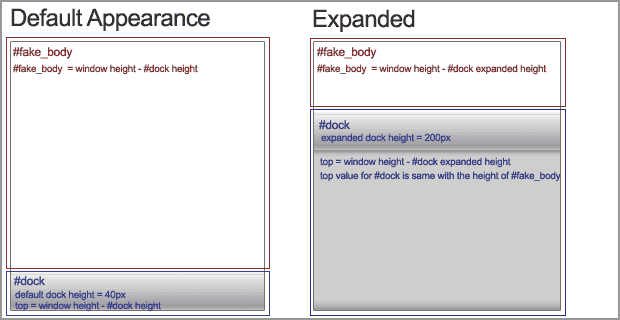
Structure for jQuery Scroll To Tab Menu

There are two sections:

  • #fake_body : With this DIV, we will able to solve the page length problem. We will set the overflow to auto, so that it will display a scrollbar. The height of this DIV is always calculated with jQuery to make sure the browser's default scrollbar is hidden. The height of #fake_body equal to the height of browser window minus the dock's height.
  • #dock : We will use javascript to set the position to absolute and top value for this DIV. In case browser doesnt support javascript, everything will just display correctly.

1. HTML

It's so simple and clean, I guess, I don't have to explain anything about it. :)

<div id="fake-body">

	<!-- Put your entire website in this section -->

</div>

<div id="dock">
	<!-- Put your dock in this section -->
</div>

2. CSS

There are three things:

  1. BODY : body's margin and padding must set to 0, otherwise, it will mess up the height calculation in jQuery.
  2. #fake-body : Overflow is set to auto, so that a scroll bar is displayed.
  3. #dock : You need to set the Expanded Height for the #dock. It's has two reasons: if javascript is disabled, the dock in full size will be displayed in the bottom of the page and we will need it for jquery calculations (position and height for #fake_body and #dock).
/* 
margin and padding must be 0,
otherwise, you have to set it in jQuery
*/
body {
margin:0; 
padding:0
}

#fake-body {
overflow:auto;
z-index:1;
}

#dock {
background:#ccc;
height:200px;
z-index:100;
width:100%;
}

3. Javascript

I have put comments in every single lines, if you have any questions, please drop me a comment.

$(document).ready(function() {

	//Transition you want :)
	var easing_type = 'easeOutBounce';
	
	//The default height for the dock (on mouse out)
	var default_dock_height = '40';
	
	//Expanded height, the height of the dock on mouse over, you have to set it in CSS
	var expanded_dock_height = $('#dock').height();
	
	//Fake body height
	var body_height = $(window).height() - default_dock_height;
	
	//Set the size of #fake_body
	$('#fake-body').height(body_height);
	
	//Set the CSS attribute for #dock
	$('#dock').css({'height': default_dock_height, 'position':'absolute', 'top': body_height});
	
	//In case the user resize the browser, we will need to recalculate the height and top for #fake_body and #dock
	$(window).resize(function () {
		
		//Grab the updated height/top
		updated_height = $(window).height() - default_dock_height;
		
		//Set the updated height for #fake_body and top for #dock
		$('#fake-body').height(updated_height);		
		$('#dock').css({'top': updated_height});
	});
		
	//The main event for the dock bottom menu
	$('#dock').mouseover(function () {
		
		//Recalculate expanded height (always get the latest height), in case user has resized the window
		expanded_height = $(window).height() - expanded_dock_height;
		
		//Animate the height change, set the height to expanded_dock_height and set the top value as well
		$(this).animate({'height':expanded_dock_height,'top': expanded_height},{queue:false, duration:800, easing: easing_type});
		
	}).mouseout(function () {
		
		//Recalculate default body height (always get the latest height), in case user has resized the window
		body_height = $(window).height() - default_dock_height;
		
		//Animate the height change, set the height to default_dock-height and set the top value as well
		$(this).animate({'height':default_dock_height,'top': body_height},{queue:false, duration:800, easing: easing_type});
		
	});
	
});

Conclusion

That's it. I'm so tempted to create a plugin for this. Anyway, make sure you check out the demo and download the source code to play with it. If you have created your own, feel free to drop your link in the comment section to show off! : )

Last but not least, I need your support :) If you like this article, please help me to promote it by adding this post into your bookmark. Or you can subscribe to my RSS for more jQuery tutorial posts! Thanks!

Demonstration Download

Copyright & Usage

The effects and techniques demonstrated in tutorials on Queness can be used in whatever manner you wish without attribution. You cannot copy whole tutorials (unless permission is given), either in English or translated to another language.

Share This Post to Support Me! :)


Comments

Better Tomo on 16 Jun 2009 says:
Great tutorial !
I like it .
Özgür Vestanbul on 16 Jun 2009 says:
Really Great tutorial. I liked it...
JDStraughan on 16 Jun 2009 says:
Added to tutlist.com. Great tutorial
Csaba on 16 Jun 2009 says:
This is really something new and interesting. JQuery is great and your tutorial too. Keep your great work !
Pradeep CD on 17 Jun 2009 says:
Nice technique.. thanks..
Joe on 21 Jun 2009 says:
It's nice but it plays with my scroll bars in Firefox (3.0.11). It overlaps them before you hover and when you hover it makes them flicker. I like this tutorial though :)
Eric Slaton on 22 Jun 2009 says:
What is the deal with this thing docking in the middle of a page when you extend your content down!
Anyone implemented this into a full site?
kevin on 22 Jun 2009 says:
@eric: Hi Eric,

you have implemented it wrongly.

You forgot to wrap your content with the #fake_body DIV. It will look something like this:

<body>
<div id="#fake_body">
..... your entire web content put in here...
</div>
<div id="#dock">
..... dock content.....
</div>
</body>
Eric Slaton on 22 Jun 2009 says:
Even if i change fake_body to body_wrapper or some other name in my CSS/js and html, shouldnt it work?
kevin on 22 Jun 2009 says:
@Eric: Yes, you did the changes correctly, but your header is not in the bodywrapper. The height of the bodywrapper is calculated based on the height of the window. But, because of your header, it adds extra 100++px and causing the display of browser default scrollbar.

you need to put ur bodywrapper after <body> ...

Eric Slaton on 22 Jun 2009 says:
Hey Kevin, I just saw that while ago! But now my header is cutting off on the sides.
I am just going to recode the page and my CSS
This is just too awesome to give up on! Man you respond quickly!!! Thanks!
kevin on 22 Jun 2009 says:
@Eric: no worries, I'm right in front of my computer now, so I can respond your question... anyway, thanks for your support :)
Eric Slaton on 22 Jun 2009 says:
Awesome Kevin! I will be here all night i am sure! LOL
I have been neglecting jumping into jQuery since my clients dont understand it, they dont want any of it! So I am just doing it, adding in some plug-ins, until I build up my own personal arsenal of jQuery knowledge.
But I built upon the fake_body instead of adding in my CSS beyond that so therefore the mess up in my height!
Eric Slaton on 22 Jun 2009 says:
hot diggity!!!
I got it! LOL
When all else fails..view source YOUR OWN CODE and CSS LOL
kevin on 22 Jun 2009 says:
well done! :) you don't have to stay all night afterall :) I once was neglecting to code javascript, but now with jQuery, javascript has became my favourite language!
Eric Slaton on 22 Jun 2009 says:
I know, I am a Software Engineer by schooling but I am into web dev by heart and now full time.
I love the heck out of jQuery. It is really all about your imagination you know.
I used to be into Flash, still fun, but now the challenge of seeing what you can do in js and with CSS is a whole lot funner!
Your site is an awesome place to go! You have great tuts and your set up takes out all of the bull crap and places what you wanna know right in front of you!
So thanks for the site, you have majorly inspired me!
kevin on 22 Jun 2009 says:
@Eric: haha, I've an IT Management degree, but am into web dev since teenage age. :)
Thanks for ur support!
Eric Slaton on 22 Jun 2009 says:
I hear you man. I had big plans for software...well everything I wanted to do...was already done!
Websites, you always get new web clients.
Again thank you for the site!
Nintensity on 23 Jun 2009 says:
Hey there. I'm trying to incorporate this on my website. It's working smoothly, however, in IE6 and 7, the scrollbar is present, however, when I move down, the content doesn't move down; it still stays where it is.

Take a look at it at http://www.nintensity.net/clients/vancouveritf/ and let me know how it works! thanks man!
Nintensity on 24 Jun 2009 says:
I realized what the problem was:

I used a special CSS method called "Faux" absolute positioning which combined floating with relative positioning for flexible layouts... because of this, this 'disabled' my scrolling in IE6 and IE7. At least I know now! thanks man.
Race Media on 3 Jul 2009 says:
Trying to incorporate this here http://www.australiangambling.com.au/ but something is not right. Would you mind helping?
Race Media on 3 Jul 2009 says:
Okay, worked through this issue - it is a jQuery conlfict in you code above when using other javascript like protoype and scriptaculous - had to change all the $ calls to jQuery and it worked
Race Media on 4 Jul 2009 says:
Only problem is I have some "span class" titles which now scroll down the page. Anyone know why?

Also - The dock wants to start half way across the page in IE but is fine in FF, Opera and Chrome
kevin on 4 Jul 2009 says:
@Race Media: Not sure what's happening, I have tested this dock with IE, Chrome, Safari and Firefox... they're all working fine.

Anyway, it's not a good idea to mix all the javascript frameworks.
Race media on 8 Jul 2009 says:
Thx Kevin - it's not a conflict with another script its the way your script treats elments declared "position: absolute" i removed those and they don't move now
Tapeten online on 12 Jul 2009 says:
Thank u great Post. I must show this my friends ;)
PedidoDireto on 13 Jul 2009 says:
*add the line in css to fix the bug.\r\n*overflow-y:hidden;\r\n\r\n\r\nbody {\r\noverflow-y:hidden;\r\nmargin:0; \r\npadding:0;\r\n}
Pedido Direto on 13 Jul 2009 says:
add the line in body the css to fix the bugoverflow-y:hidden;
Pedido Direto on 13 Jul 2009 says:
line: overflow-y:hidden;
themeheven on 21 Jul 2009 says:
WOW good tutorial. Thanks!
NuBy on 24 Jul 2009 says:
I've implemented this great dock menu into a web page I'm currently working on and it works great but whenever I click on a link anywhere on the page, including from within the dock, the whole page goes white!? Yet, the scroll btn within the dock does work?! If I take out the html for the dock, the links work fine. What am I doing wrong? - Please help!
kevin on 26 Jul 2009 says:
@NuBy: that's weird, in my code, it has nothing to do with links. Can you send me your work?
qyne on 1 Aug 2009 says:
how to add links for menu
Cory on 15 Aug 2009 says:
Great tip. I have been looking everywhere for something like this.

I am having issue with the expanding feature though, and was wondering how I can remove that aspect and just have the bottom bar be static?

Thanks.
Cory on 15 Aug 2009 says:
I got it. Setting the height in the fake page the same as the dock. Was said above, just missed it.
Shitic on 19 Aug 2009 says:
I just didn't know how I put a variable, which was designated before, into a css rule in jquery. This example is great to solve my problem.
YCFX on 3 Sep 2009 says:

how to make the script am activate when the mouse hovers over a différent links ?
kevin on 3 Sep 2009 says:
Hi, you can change this to the link's id/class:
$('#dock').mouseover(function () { ......

havent tested it, but it should work.
Hendriono on 3 Oct 2009 says:
Great tips... Thanks alot friend... i will try it before... Thanks
cevahir on 7 Oct 2009 says:
Great tutorial !Thanks for sharing.
Architektur Visualisierung on 10 Nov 2009 says:
Good Info. Thank you!
Blackcode on 6 Dec 2009 says:
I have a problem under firefox... if i roll over the flash player menu it causes to restart... I works fine unde IE see it in action on http://enachedragos.com/
Blackcode on 6 Dec 2009 says:
the problem resides HERE:
position:absolute - position:relative

Anyone can Help???
------------------------------------------------------------

$(#dock).css({height: default_dock_height, position:relative, top: body_height});
faith on 11 Dec 2009 says:
hi thanks for the tutorial first of all!

i have a question, i see two scrollers at firefox and safari and that looks so bad...

the scroller inside scroolls the content so thats already there all the time, but the one at the outside part, when scrolled, it reveals the dock menu, i dont think i should be seeing it, right?

how can i get rid of that outer scroller?

thanks in advance
Jason on 5 Jan 2010 says:
Just made a simple .aspx page with this and when you load the page initially it does what the above comment says. Produces the scrollbar for the "fake-body" but also produces a scroll bar which scrolls down to see the whole dock. Once you mouse over the dock for the first time the outer scroll bar disapears and it works fine there on in.

Leave a comment

http://
Subscribe RSS Subscribe RSS, Keep yourself updated with queness latest posts!
Pixel Crayons Buy and Sell Flash Buy and Sell Flash

Buy wholesale computers directly from China at DHgate.com

Discover the tools to build your e-Commerce Site with Netfirms

  •  
  •  
  •  
  •  
  •  

Community News

Recent Comments

Random Posts


View all posts and news Back to top

About the Author

A web designer and developer who is passionate and keen on contributing to the web development industry. Feel free to say hi to me, or follow me on twitter.

Kevin Liew

Partner

  • Web and Designers
  • CSS Style
  • PV.M Garage Blogzine - (Italian)
  • TutsValley
  • Designrfix
  • CoolVibe
  • Web Developer Juice
  • Denbagus
  • Web Hosting Secret Revealed
  • PSD to HTML Conversion
  • BlueHost