
Introduction
Just last week, I came accross to this website Narrow Design. His scroll menu caught a lot of my attentions, I played with it for a while. Yes, unfortunately, it's built in flash. And, Yes, we are going to implement it with jquery - javascript based scroll menu that will do the same thing. Of course, it will not be 100% the same, because some of the fancy features just not that practical to implement with javascript.
So, in this tutorial, we will learn how to create a scroll menu. We will achieve the following objectives:
- Keep html as simple as possible, and let jQuery and CSS do the rest.
- Scoll up and down according to mouse-Y axis
- Use jQuery.color plugin to animate the background-color changes - download jQuery.color
(Yes, you will need this to animate the background color, I thought it will do it by default, obviously it doesn't! )
Just before we start, let me explain 3 important jquery methods we're going to use:
1. Get mouse axisThe following code will return the X and Y Axis values for your mouse pointer.
<script>
$(document).mousemove(function(e) {
$('#mouse_axis').html("X Axis : " + e.pageX + " | Y Axis " + e.pageY);
});
</script>

<div id="mouse_axis"></div>
2. Get objects offset
The following code will get the offset Top and Left for an object.
<script>
$(document).ready(function() {
$('#offset').html("Top : " + $('#sidebar').offset().top + " |Left "
+ $('#sidebar').offset().left);
});
</script>

<div id="offset"></div>

<br/>
<br/>
<br/>
<div id="Sidebar">A Empty DIV named sidebar</div>
3. Get the total of selected elements by the selector.
It will return the total of selected elements.
$('#menu li').length;
Graphical Explanation
Please refer to the following div structure:
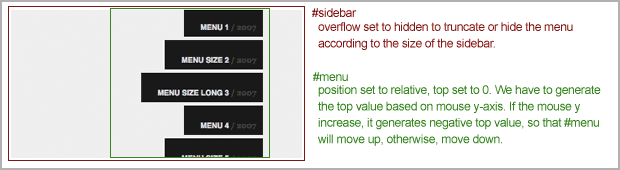
2 main DIVs #sidebar and #menu:
#sidebar : its overflow property is set to hidden. Overflow set to hidden will truncate/hide #menu's extra length and display the #menu according to the width and height of the #sidebar.
#menu : its position property is set to relative. So that if top property set to 0, #menu will snap to the top of #sidebar. So, even with no javascript, you can test the menu with random negative numbers, for example -30px, -100px or -500px. You will able to see the menu is going up. So, jQuery's job is to generate this negative values. To dynamicly generate these values, we will use the mouse-Y, because we want to scroll it up and down. It's quite complicated to explain, but we will walk through it in javascript section.
1. HTML
As usual, we always keep the HTML code as simple as possible. It's good to not mix javascript with html code to increase readibility and tidiness.
The SPAN in this example can be taken out, I put it in just to immitate the menu from Narrow Design.
<div id="sidebar">
<ul id="menu">
<li><a href="#">MENU 1 <span> / 2007</span></a></li>
<li><a href="#">MENU SIZE 2 <span> / 2007</span></a></li>
<li><a href="#">MENU SIZE LONG 3 <span> / 2007</span></a></li>
<li><a href="#">MENU 4 <span> / 2007</span></a></li>
<li><a href="#">MENU SIZE 5 <span> / 2007</span></a></li>
<li><a href="#">MENU SIZE LONG 6 <span> / 2007</span></a></li>
......
......
......
</ul>
</div>
2. CSS
I have played with this CSS for quite a while to achieve the effect I want and tested it with IE as well. I was having this IE problem, where the position:relative and overflow:hidden just won't work the way it should. Fortunately, I found the solution through this website - solution to position relative and overflow in IE. Bingo, it displays exactly the same now.
#sidebar has to set as overflow:hidden to make sure the extra length in the menu is hidden. And the rest is just basic styling for the menu.
body {
padding:0;
margin:0 20px;
}

#sidebar {
height:400px;
overflow:hidden;
position:relative;
background-color:#eee;
}

#menu {
width:100%;
list-style:none;
padding:0;
margin:0;
top:0;
position:relative;
height:100%;
width:300px;
}

#menu li {
padding:10px 0;
text-align:right;
display:block;
cursor:hand;
cursor:pointer;
}

#menu li a {
background:url() repeat #1f1f1f;
color:#ddd;
font-family:helvetica, arial, verdana;
font-size:9px;
font-weight:900;
display:inline;
padding:20px 8px 5px 20px;
text-decoration:none;
}

#menu li span {
font-family:georgia, arial;
font-size:9px;
color:#464646;
}
3. Javascript
In javascript section, I have separated all the configurable variables on the top of the script. It'll be easier to convert it to a plugin.
The most important part of this script is the last section - generate the top value based on the mouse Y value to allow user to scroll through the entire menu, and won't be affected by the offset of the sidebar as well. The mathematic equation I'm using, it's not the perfect one, but it works. If you have better suggestions, please drop me a message. : )
$(document).ready(function() {

	//Background color, mouseover and mouseout
	var colorOver = '#31b8da';
	var colorOut = '#1f1f1f';

	//Padding, mouseover
	var padLeft = '20px';
	var padRight = '20px'

	//Default Padding
	var defpadLeft = $('#menu li a').css('paddingLeft');
	var defpadRight = $('#menu li a').css('paddingRight');

	//Animate the LI on mouse over, mouse out
	$('#menu li').click(function () {
		//Make LI clickable
		window.location = $(this).find('a').attr('href');

	}).mouseover(function (){

		//mouse over LI and look for A element for transition
		$(this).find('a')
		.animate( { paddingLeft: padLeft, paddingRight: padRight}, { queue:false, duration:100 } )
		.animate( { backgroundColor: colorOver }, { queue:false, duration:200 });

	}).mouseout(function () {

		//mouse oout LI and look for A element and discard the mouse over transition
		$(this).find('a')
		.animate( { paddingLeft: defpadLeft, paddingRight: defpadRight}, { queue:false, duration:100 } )
		.animate( { backgroundColor: colorOut }, { queue:false, duration:200 });
	});

	//Scroll the menu on mouse move above the #sidebar layer
	$('#sidebar').mousemove(function(e) {

		//Sidebar Offset, Top value
		var s_top = parseInt($('#sidebar').offset().top);

		//Sidebar Offset, Bottom value
		var s_bottom = parseInt($('#sidebar').height() + s_top);

		//Roughly calculate the height of the menu by multiply height of a single LI with the total of LIs
		var mheight = parseInt($('#menu li').height() * $('#menu li').length);

		//I used this coordinate and offset values for debuggin
		$('#debugging_mouse_axis').html("X Axis : " + e.pageX + " | Y Axis " + e.pageY);
		$('#debugging_status').html(Math.round(((s_top - e.pageY)/100) * mheight / 2));

		//Calculate the top value
		//This equation is not the perfect, but it 's very close
		var top_value = Math.round(( (s_top - e.pageY) /100) * mheight / 2)

		//Animate the #menu by chaging the top value
		$('#menu').animate({top: top_value}, { queue:false, duration:500});
	});


});
Conclusion
That's it. Make sure you check out the demo and download the source code to play with it. Last but not least, I need your support :) If you like this article, please help me to promote it by adding this post into your bookmark. Or you can subscribe to my RSS for more posts. Thanks!

Comments will be moderated and
rel="nofollow"will be added to all links. You can wrap your coding with[code][/code]to make use of built-in syntax highlighter.<script>
$(document).ready(function() {
//Scroll the menu on mouse move above the #sidebar layer
$('#sidebar').mousemove(function(e) {
//Sidebar Offset, Top value
var s_top = parseInt($('#sidebar').offset().top);
//Sidebar Offset, Bottom value
var s_bottom = parseInt($('#sidebar').height() + s_top);
//Sidebar height
var s_height = s_bottom - s_top;
//Mouse Y axis height
var mouseHeight = (e.pageY - s_top);
//calculate percentage of total height mouse has moved
var mousePer = mouseHeight / s_height;
//Roughly calculate the height of the menu by multiply height of a single LI with the total of LIs
var mheight = parseInt($('#menu li').height() * $('#menu li').length);
// the value 70 and 20 are there to make the very top and very bottom display a little nice
// in my application. If you find there's too big or too small of a gap at the top or bottom
// of your list, change the numbers around a bit. Get rid of them for a 100% mouse movement
// top to bottom
var top_value = (mousePer * (mheight - s_height + 70) * -1) + 20;
//Animate the #venues by chaging the top value
if ( (mheight - s_height) > 0 ) {
$('#menu').animate({top: top_value}, { queue:false, duration:500});
}
});
});
</script>
Graham / Amine, I'm trying to add this updated code into the downloaded source file but am having difficulty making it work again. :S I'm just learning java, please help! Why might copy/pasting this new code not work?? I'm adding/replacing everything after "//Scroll the menu on mouse move above the #sidebar layer"...
"var top_value = (mousePer * (mheight - s_height + 900) * -1) + 20; "
I'm very new in jquery. I have tried to implement this on my site for a few days and I couldn't find the way to implement the javascript. In my site I already insert the html and the css, I see the menu in my site without any animation. I tried to paste the javascript code in to the function.php in my wordpress and damage my page. I also tried to include the source code files in js file in my theme and did not work.
Can someone explain step by step on how to include the javascript in to wordpress?
In which file I have to paste the code provided in this tutorial?
If I have to include any js file by ftp?
I need help to implement this nice menu in to my wordpress site. Thanks
$('#sidebar').mouseleave(function () {
$('#menu').animate({top: 0}, { queue:false, duration:500});
});
this will do that menu will reset (almost) to its start position after mouse eaves sidebar area
i was wanderring that Graham fixxed his condition for a little bit softer menu moves without bottom or top vanisshing :)
can anyone help me make it so that each 'li' has a different background colour on colorOver and colorOut so each li is different
thankyouu